TL;DR; Explains the MSB4018 “BuildShadowTask” error in TFS when using Accessors in unit test projects, its cause, and how removing .accessor files resolves build issues.

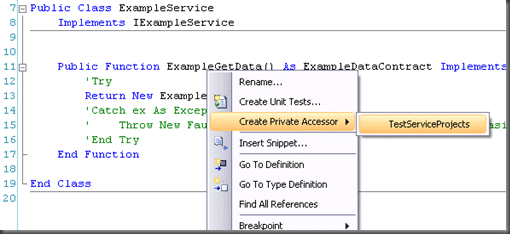
There seams to be a problem in MSBuild when you add an “Accessor” as part of a Unit Test project.
1C:Program FilesMSBuildMicrosoftVisualStudiov9.0TeamTestMicrosoft.TeamTest.targets(14,5): error MSB4018: The "BuildShadowTask" task failed unexpectedly. 2System.IO.FileLoadException: API restriction: The assembly 'file:///C:WINDOWSMicrosoft.NETFrameworkv2.0.50727System.Web.dll' has already loaded from a different location. It cannot be loaded from a new location within the same appdomain. 3 at System.Reflection.Assembly._nLoad(AssemblyName fileName, String codeBase, Evidence assemblySecurity, Assembly locationHint, StackCrawlMark& stackMark, Boolean throwOnFileNotFound, Boolean forIntrospection) 4 at System.Reflection.Assembly.nLoad(AssemblyName fileName, String codeBase, Evidence assemblySecurity, Assembly locationHint, StackCrawlMark& stackMark, Boolean throwOnFileNotFound, Boolean forIntrospection) 5 at System.Reflection.Assembly.InternalLoad(AssemblyName assemblyRef, Evidence assemblySecurity, StackCrawlMark& stackMark, Boolean forIntrospection) 6 at System.Reflection.Assembly.InternalLoadFrom(String assemblyFile, Evidence securityEvidence, Byte[] hashValue, AssemblyHashAlgorithm hashAlgorithm, Boolean forIntrospection, StackCrawlMark& stackMark) 7 at System.Reflection.Assembly.ReflectionOnlyLoadFrom(String assemblyFile) 8 at Microsoft.VisualStudio.TestTools.UnitTesting.Publicize.WebBinder.LoadData() 9 at Microsoft.VisualStudio.TestTools.UnitTesting.Publicize.WebBinder.Init() 10 at Microsoft.VisualStudio.TestTools.UnitTesting.Publicize.Shadower..ctor() 11 at Microsoft.VisualStudio.TestTools.BuildShadowReferences.BuildShadowTask.Execute() 12 at Microsoft.Build.BuildEngine.TaskEngine.ExecuteInstantiatedTask(EngineProxy engineProxy, ItemBucket bucket, TaskExecutionMode howToExecuteTask, ITask task, Boolean& taskResult)
An Accessor allows your test project to access code that would normally be “Private” or “Friend” from outside the Assembly that it resides in.
It creates a little file with the “.accessor” extension that is the same name as your DLL, and contains the name of the DLL.
If you remove this file then your remote MSBuild server will then build you solution successfully again including running your Unit Tests.
Reference:
Re: BuildShadowTask Failed unexpectedly - Accessor Problem (Upconvert VS 2005 to 2008) – URGENT
BuildShadowTask Failed unexpectedly - Accessor Problem (Upconvert VS 2005 to 2008) – URGENT
Each classification [Concepts, Categories, & Tags] was assigned using AI-powered semantic analysis and scored across relevance, depth, and alignment. Final decisions? Still human. Always traceable. Hover to see how it applies.
If you've made it this far, it's worth connecting with our principal consultant and coach, Martin Hinshelwood, for a 30-minute 'ask me anything' call.
We partner with businesses across diverse industries, including finance, insurance, healthcare, pharmaceuticals, technology, engineering, transportation, hospitality, entertainment, legal, government, and military sectors.

Emerson Process Management

Hubtel Ghana

Boeing

Milliman

Graham & Brown

New Signature

Illumina

DFDS

YearUp.org

Genus Breeding Ltd

Workday
NIT A/S

Akaditi

Freadom

Sage

Jack Links

Epic Games

Healthgrades

New Hampshire Supreme Court

Royal Air Force

Washington Department of Transport

Washington Department of Enterprise Services

Department of Work and Pensions (UK)

Ghana Police Service

Higher Education Statistics Agency

Workday

Graham & Brown

Brandes Investment Partners L.P.

MacDonald Humfrey (Automation) Ltd.

Hubtel Ghana