Install and Configuration
Move Azure VM to a Virtual Network
Learn how to move an Azure virtual machine to a virtual network by deleting the VM, preserving its disks, and recreating it within the desired network …
TL;DR; Moving a VHD between Azure storage accounts is more complex than expected because you must authenticate separately to each account, even with an authenticated session. The process requires extra PowerShell scripting to set up contexts for both source and target accounts and initiate the copy. Once set up, you can reuse the script to move VHDs as needed, so consider saving it for future migrations.


Move an Azure storage blob to another store took a little bit longer than I thought that it would. All I wanted to do was move a VHD from one storage account to another. However this is a little more complicated than it seems on the surface.
I am working on teaching the Managing Projects with Microsoft Visual Studio Team Foundation Server 2013 course in Cheltenham this week and have been creating training virtual machines in Azure . My template is 80GB and it is quite an arduous task to upload it. I now want to move it to a new, less temporary, home.
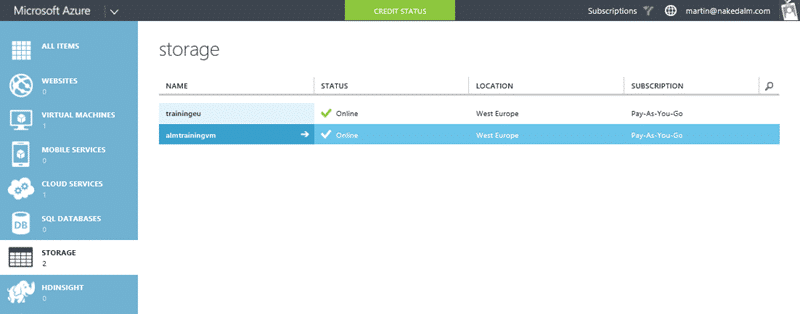
I want to move my training VM from the “trainingeu” storage account to the “almtrainingvm” one. This is really just a refactor now that I have everything working and have thought about a new home. The copy process however is a little bit convoluted, especially as both containers are marked as private.
What I really want to be able to do is just call “Copy-AzureStorageBlob -source https://trainingeu.blob.core.windows.net/vhds/bkvm-2013-3.vhd -destination https://almtrainingvm.blob.core.windows.net/vhds/bkvm-2013-3.vhd ” and be done with it. But alas… this is not to be as we need to authenticate to both storage accounts separately even though we are authenticated against the main account.
So… we need a little more PowerShell than I wanted:
 1Select-AzureSubscription "Pay-As-You-Go"
 2
 3### Source VHD
 4
 5$sourceUri = "https://trainingeu.blob.core.windows.net/vhds/bkvm-2013-3.vhd"
 6
 7$sourceStorageAccount = "trainingeu"
 8
 9$sourceStorageKey = "bla"
10
11$sourceContext = New-AzureStorageContext –StorageAccountName $srcStorageAccount `
12
13-StorageAccountKey $srcStorageKey
14
15### Target VHD
16
17$targetName = "bkvm-2013-3.vhd"
18
19$targetStorageAccount = "almtrainingvm"
20
21$targetStorageKey = "bla"
22
23$targetContainerName = "vhds"
24
25$targetContext = New-AzureStorageContext –StorageAccountName $targetStorageAccount `
26
27-StorageAccountKey $targetStorageKey
28
29$blob1 = Start-AzureStorageBlobCopy -srcUri $sourceUri -SrcContext $sourceContext -DestContainer $targetContainerName -DestBlob $targetName -DestContext $targetContext

Why we can’t do this with URL’s and an authenticated account I do not know… but this is what we got and we have to roll with it.
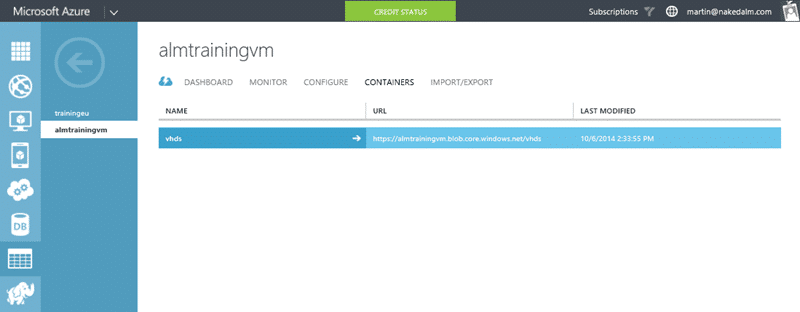
Now that I have my VHD over here I can change my default store and create my Virtual Machines from this VHD instead of the other one. Not the easiest task, but now I have some lovely PowerShell I should be able to move VHD’s between Azure Storage Accounts any time I like.
If you've made it this far, it's worth connecting with our principal consultant and coach, Martin Hinshelwood, for a 30-minute 'ask me anything' call.
We partner with businesses across diverse industries, including finance, insurance, healthcare, pharmaceuticals, technology, engineering, transportation, hospitality, entertainment, legal, government, and military sectors.

Freadom

Kongsberg Maritime

Healthgrades

Brandes Investment Partners L.P.

Bistech

Epic Games

Illumina

DFDS

Qualco

Trayport
ProgramUtvikling

Graham & Brown

Jack Links

Philips

Slaughter and May

Hubtel Ghana

Emerson Process Management
Boxit Document Solutions

New Hampshire Supreme Court

Washington Department of Transport

Nottingham County Council

Department of Work and Pensions (UK)

Ghana Police Service

Royal Air Force

Xceptor - Process and Data Automation
CR2

Flowmaster (a Mentor Graphics Company)
NIT A/S

Slicedbread
Bistech