Agentic Agility
Allow user to change the region for Windows Live ID billing
Explains the challenges users face when unable to change the billing region for Windows Live ID, affecting access to Microsoft services after moving …
TL;DR; Explains the differences between British and American English spelling, and shows how to switch language settings in Word and PowerPoint using macros for correct spellcheck.


On of the issues that we have had in the office recently is that the rest of the Office, through no fault of their own, speaks and uses American English. I however along with the majority of the English speaking world use British English.
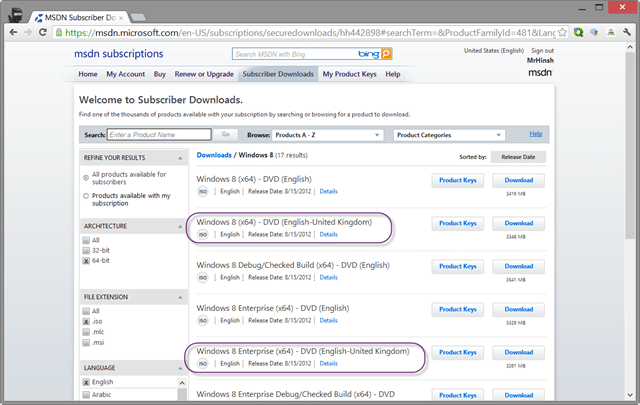
Microsoft have recognised this with the inclusion of Windows 8 (English-United Kingdom) as an edition of Windows that you can install.
Figure: Windows 8 (English-United Kingdom)
This will then give us the holly grail of Favourite spelled correctly in Windows!
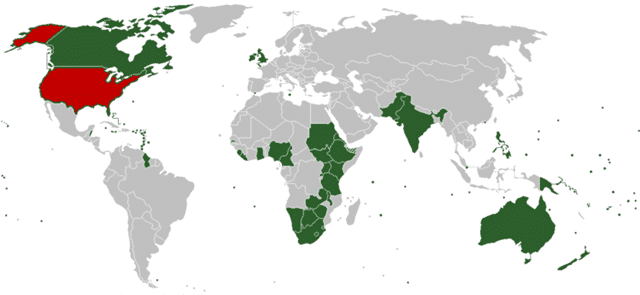
Using the obvious truth of Wikipedia I make it around 2,121,502,169 people live in countries that have English as their national language and only 309,442,00 of which are American English… give or take…
Figure: Who speaks what where
Yes, I realise that I am being wholly unscientific and that I currently live smack in that red area, but I just can’t bear to go native where language is concerned. Every time I see an incorrect spelling of “Tire”, “Favourite” or “Serialise” I have and insatiable itch to fix it…
Macros to the rescue
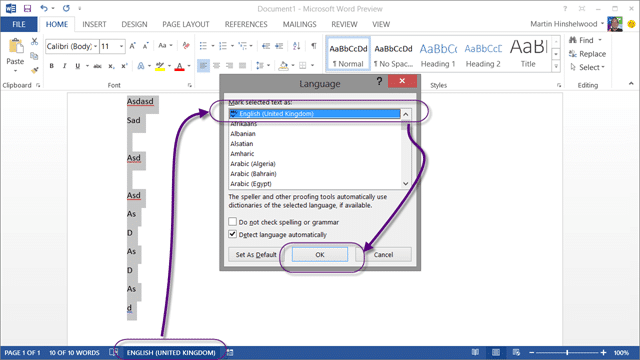
Word is easy.. if you want to change the default language all you do is Ctrl+A to select all of the text and change it.
Figure: Changing document language
Similarly the reverse is true and you can have your bad spelling 
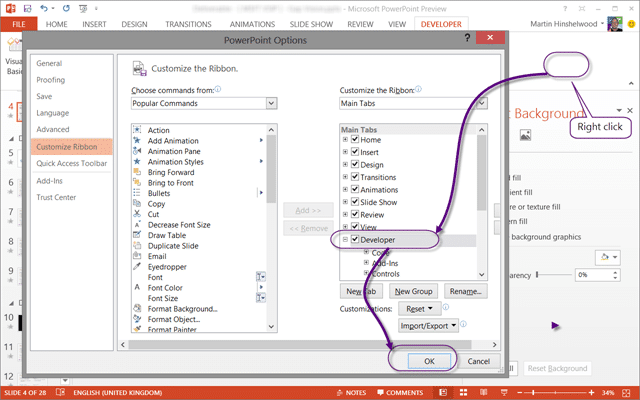
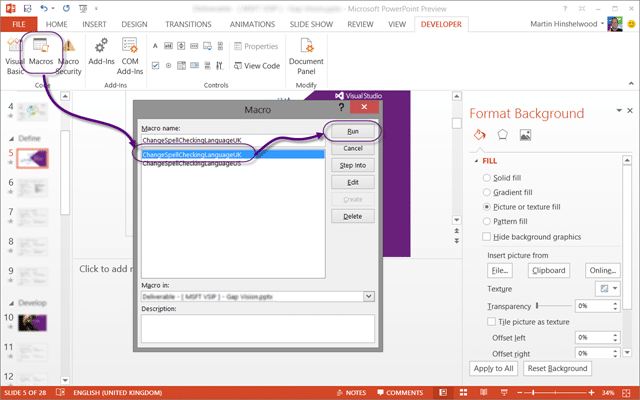
PowerPoint is a little more difficult. You need to change it for every shape and there is no way to globally change this. Which does kind of suck, but not is you know macros. So fire up your “Developer” bar, select “Add Code” and create a new module.
Figure: How to get the developer bar
To that module you can then add the following code.
 1Option Explicit
 2Public Sub ChangeSpellCheckingLanguageUK()
 3    Dim j As Integer, k As Integer, scount As Integer, fcount As Integer
 4    scount = ActivePresentation.Slides.Count
 5    For j = 1 To scount
 6        fcount = ActivePresentation.Slides(j).Shapes.Count
 7        For k = 1 To fcount
 8            If ActivePresentation.Slides(j).Shapes(k).HasTextFrame Then
 9                ActivePresentation.Slides(j).Shapes(k) _
10                .TextFrame.TextRange.LanguageID = msoLanguageIDEnglishUK
11            End If
12        Next k
13    Next j
14End Sub
15
16
17Public Sub ChangeSpellCheckingLanguageUS()
18    Dim j As Integer, k As Integer, scount As Integer, fcount As Integer
19    scount = ActivePresentation.Slides.Count
20    For j = 1 To scount
21        fcount = ActivePresentation.Slides(j).Shapes.Count
22        For k = 1 To fcount
23            If ActivePresentation.Slides(j).Shapes(k).HasTextFrame Then
24                ActivePresentation.Slides(j).Shapes(k) _
25                .TextFrame.TextRange.LanguageID = msoLanguageIDEnglishUS
26            End If
27        Next k
28    Next j
29End Sub
Figure: Macro to change between English US and English UK
Now at the click of a button you can change the whole presentation from “Bad English” to “Good English” and back again.
Figure: Change PowerPoint language
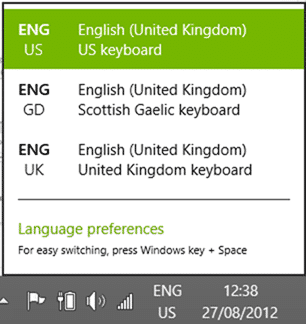
This will help me greatly as I can then write all of my things in the English that I am accustomed to…
Figure: My keyboard settings
What do you think are my chances at getting the world to switch to Gaelic?
Each classification [Concepts, Categories, & Tags] was assigned using AI-powered semantic analysis and scored across relevance, depth, and alignment. Final decisions? Still human. Always traceable. Hover to see how it applies.
If you've made it this far, it's worth connecting with our principal consultant and coach, Martin Hinshelwood, for a 30-minute 'ask me anything' call.
We partner with businesses across diverse industries, including finance, insurance, healthcare, pharmaceuticals, technology, engineering, transportation, hospitality, entertainment, legal, government, and military sectors.

Akaditi

Trayport

Higher Education Statistics Agency

Big Data for Humans
ProgramUtvikling

Cognizant Microsoft Business Group (MBG)
NIT A/S

YearUp.org

Alignment Healthcare

New Signature

Workday

Emerson Process Management

Epic Games

Freadom

Boeing

Flowmaster (a Mentor Graphics Company)

Lockheed Martin

Milliman

Ghana Police Service

Nottingham County Council

Washington Department of Transport

Royal Air Force

Washington Department of Enterprise Services

Department of Work and Pensions (UK)
Flowmaster (a Mentor Graphics Company)

Slicedbread
Cognizant Microsoft Business Group (MBG)
New Signature
YearUp.org

Capita Secure Information Solutions Ltd