Troubleshooting
Microsoft, please help me diagnose TFS Administration permission issues!
Troubleshooting TFS 2010 admin permission errors caused by not running TfsConfig as administrator, despite correct group memberships and server …
TL;DR; Learn how to grant users or groups access to TFS 2012 diagnostic activity logs for troubleshooting without full admin rights, using command-line permission settings.

In TFS 2012 the product team added a way to get to the tbl_Command information without needing to connect directly to the SQL Server and having access to the tables. This was an awesome add as being able to diagnose server issues and troubleshoot user reported problems makes us a little more efficient.
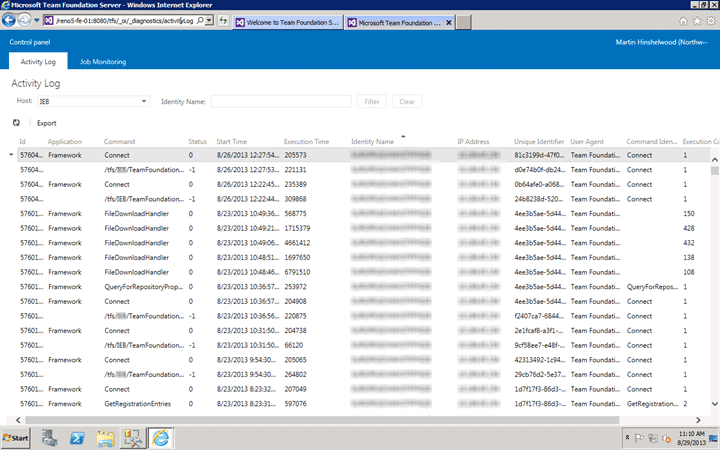
Figure: Viewing the diagnostic activity logs for troubleshooting
However I had always had to give access by adding the user to the “Team Foundation Administrators” group which is a little too much power just to do a little diagnostic spelunking… so my question is:
How do I give permission to the Activity Log without giving TFS Administrator?
Well, it looks like the command line has the answer. Although there is no representative entry in the GUI to give permission for a user only to the diagnostic troubleshooting page you can grant it explicitly:
1tfssecurity /a+ Diagnostic Diagnostic Troubleshoot n:domain\username ALLOW /server:http://tfsserver:8080
This gives that group explicit access.
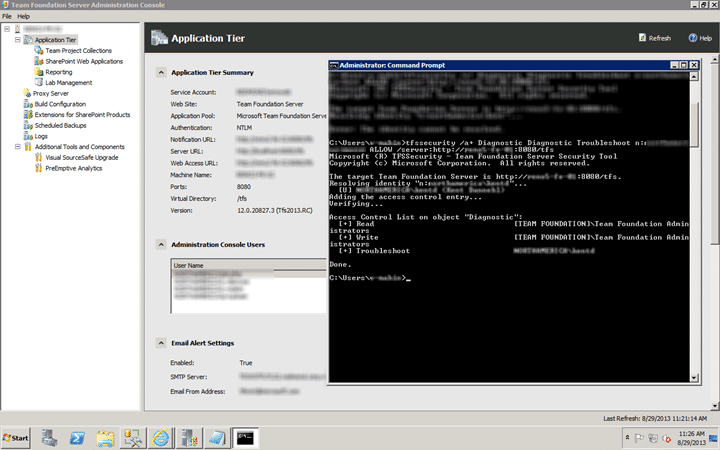
Figure: Use the command line to grant diagnostic troubleshooting permission
What might be a better and more manageable solution would be to create a group called “Team Foundation Troubleshooters” and instead grant that group permission to that access control. This is done in exactly the same way, you just need to replace the domain account with the TFS Group.
Each classification [Concepts, Categories, & Tags] was assigned using AI-powered semantic analysis and scored across relevance, depth, and alignment. Final decisions? Still human. Always traceable. Hover to see how it applies.
If you've made it this far, it's worth connecting with our principal consultant and coach, Martin Hinshelwood, for a 30-minute 'ask me anything' call.
We partner with businesses across diverse industries, including finance, insurance, healthcare, pharmaceuticals, technology, engineering, transportation, hospitality, entertainment, legal, government, and military sectors.

Alignment Healthcare

SuperControl

Emerson Process Management
Cognizant Microsoft Business Group (MBG)

Workday

Deliotte

Illumina

Philips

Capita Secure Information Solutions Ltd

Lean SA

Slicedbread

New Signature

YearUp.org

Jack Links

Milliman

Xceptor - Process and Data Automation

Lockheed Martin

Slaughter and May

Washington Department of Transport

Washington Department of Enterprise Services

Department of Work and Pensions (UK)
Ghana Police Service

Nottingham County Council
Royal Air Force

Epic Games
Illumina

Qualco
Emerson Process Management

Flowmaster (a Mentor Graphics Company)

Freadom